Data Science for Electron Microscopy
Week 1: Python crash course & the EM data deluge
Book that covers many topics of the course
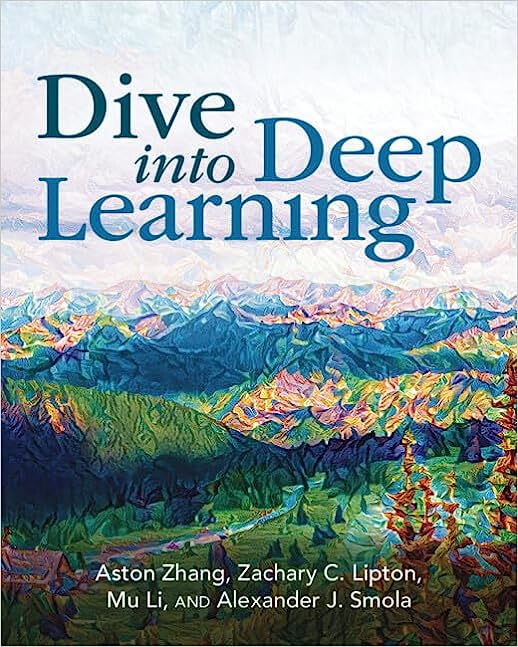
- Dive into Deep Learning Zhang, Aston et al., (2023): an interactive book with code, maths and discussions.
- Implemented with PyTorch, NumPy/MXNet, JAX and TensorFlow.
- Adopted at 500 universities in 70 countries.
- We use the PyTorch framework for our coding.
STEM operating modes
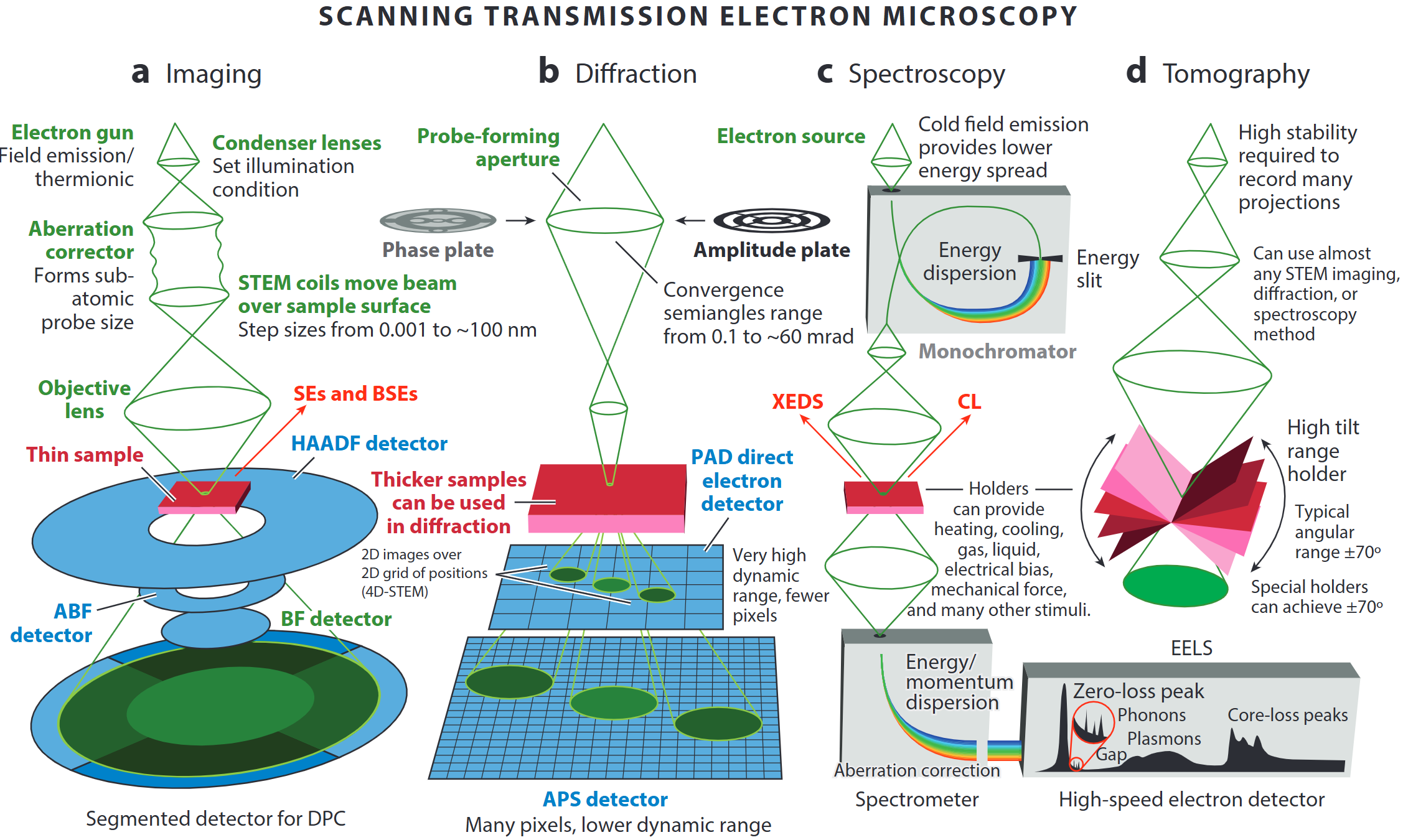
- A modern microscope can switch on the fly between
- incoherent imaging,
- diffraction/4D-STEM,
- EELS / XEDS spectroscopy, and
- tilt-series tomography
- incoherent imaging,
- “A synchrotron in a microscope”: one tool covers Å-to-µm length-scales and meV-to-keV energy-scales.
4DSTEM - Design of experiments
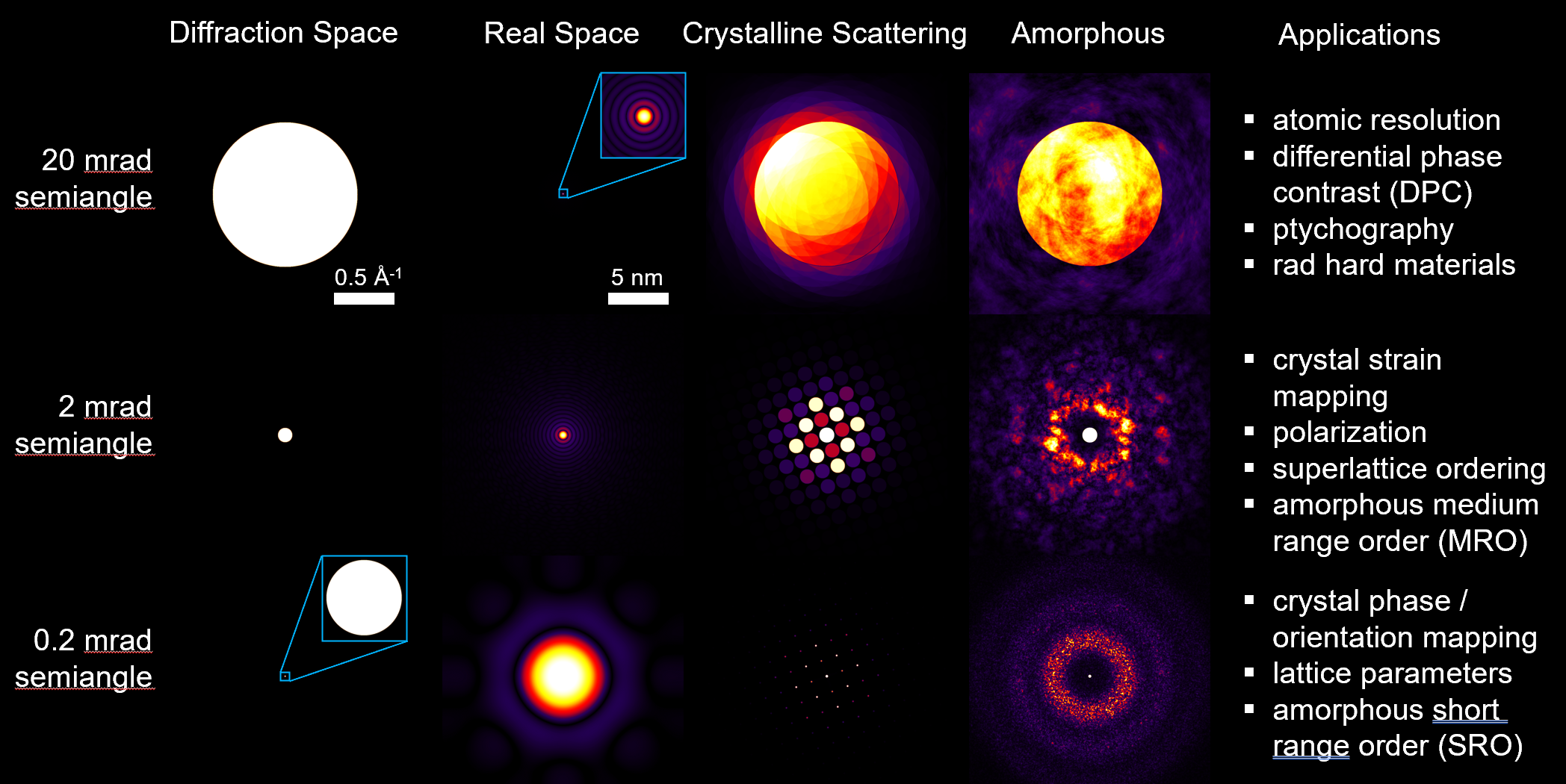
Single-atom Z-contrast
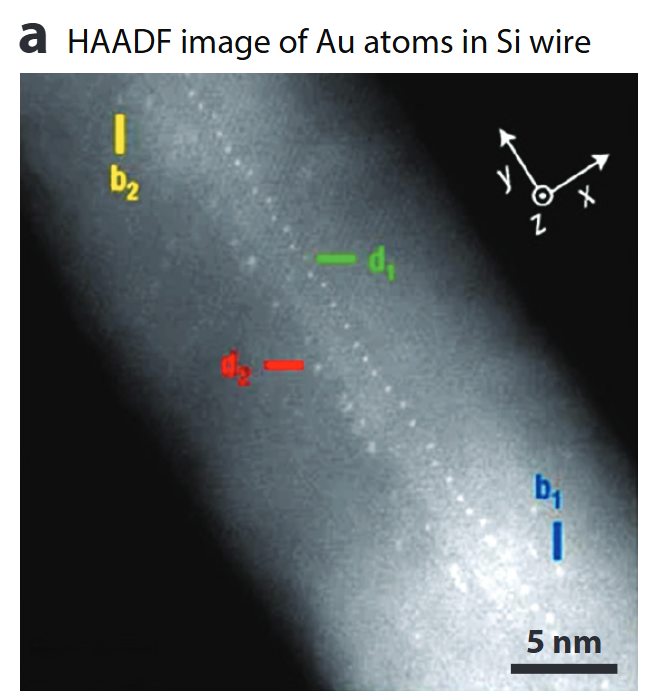
- HAADF collects high-angle incoherent scattering → intensity ∝ Z^1.6 – Z^1.9
- Detects & counts individual heavy atoms, even inside a nanowire.
- Sub-picometre column-position metrology enables strain & segregation studies.
Calibrated composition imaging
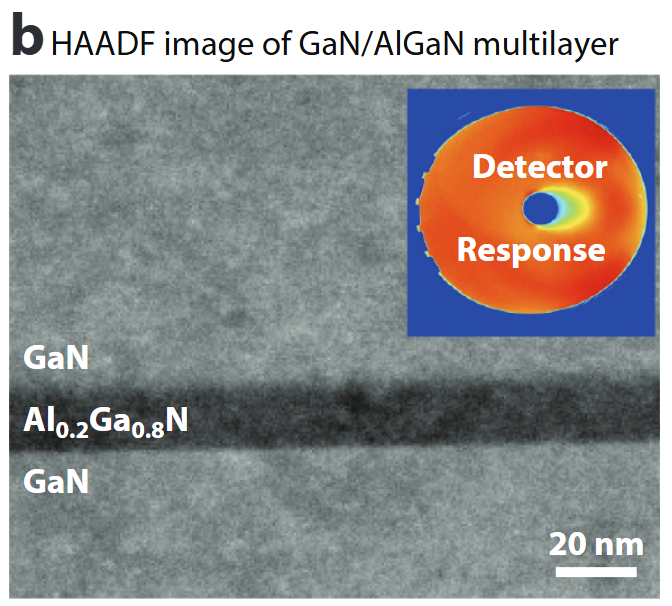
- Absolute detector-response calibration converts HAADF signal to atomic areal density .
- Enables nm-scale composition profiles (here Al₀.₂Ga₀.₈N) & local thickness determination to ≈1 nm.
Seeing light elements – ABF/BF
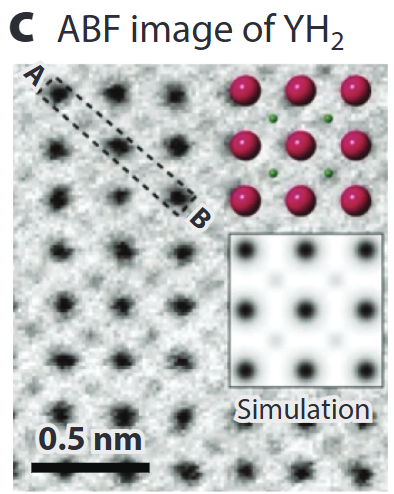
- Annular Bright-Field (ABF) records low-angle transmitted beam: simultaneously heavy & very light atoms (H, Li, O) .
- Quantitative contrast modelling (multislice + frozen phonon) allows thickness & defocus refinement.
Mapping internal fields – DPC
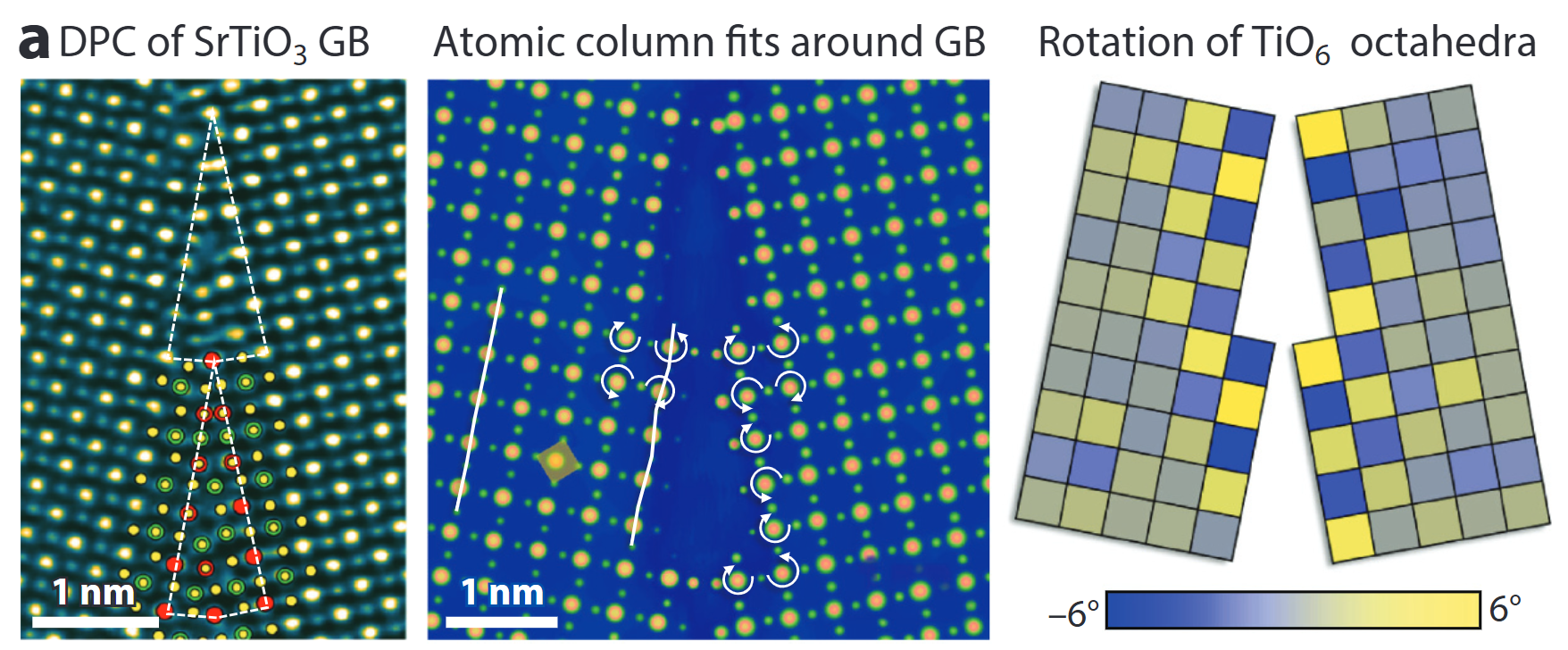
- Segmented / pixelated detectors yield differential phase-contrast (DPC) images.
- Linear to projected electric-field; with sample flip or advanced analysis → magnetic induction too .
- Here: TiO₆ octahedra rotations and GB polarity resolved at the picometre level.
4D-STEM diffraction & orientation mapping
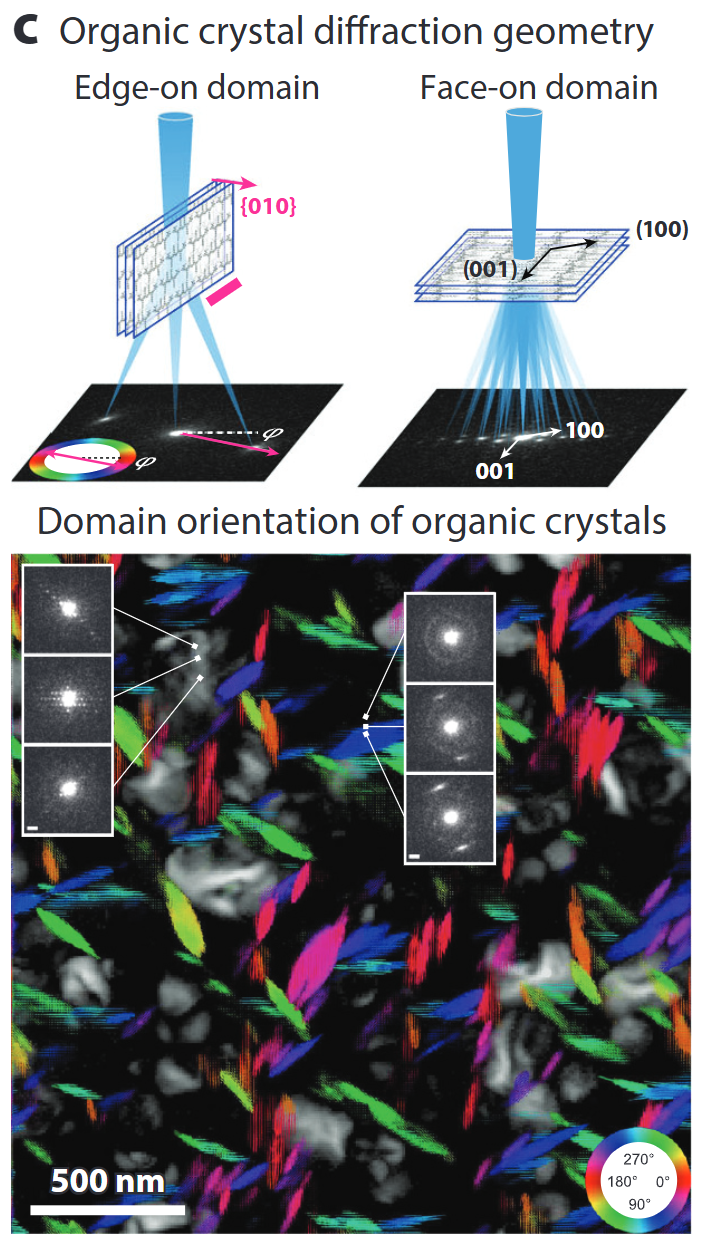
- Pixelated cameras record a CBED pattern at every probe position → 4D data cube.
- From disks, extract local strain, orientation, thickness, even (via ptychography) phases beyond the probe NA.
- Matching experiment to simulation (thermal + inelastic) achieves quantitative thickness/chemistry
Spectroscopy – EELS/XEDS
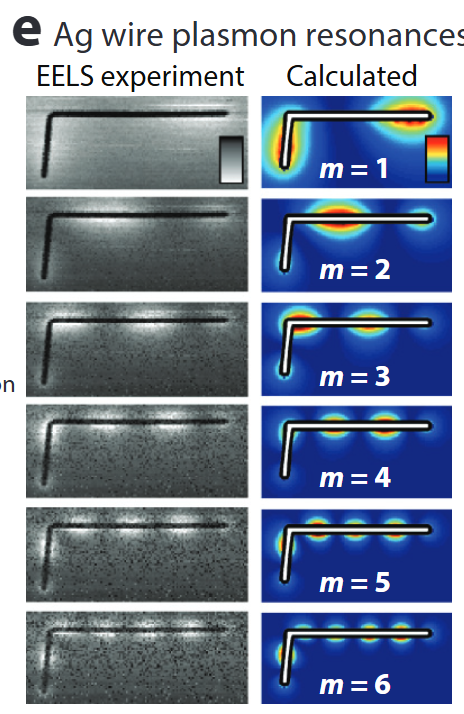
- STEM-EELS resolves plasmons (few eV), phonons (meV) & core-loss fine structure (bonding, oxidation).
- Combined with modelling (BEM, DFT, multiplet) for nanophotonic mode mapping .
- Parallel XEDS gives simultaneous 3-D elemental maps.
Atomic electron tomography
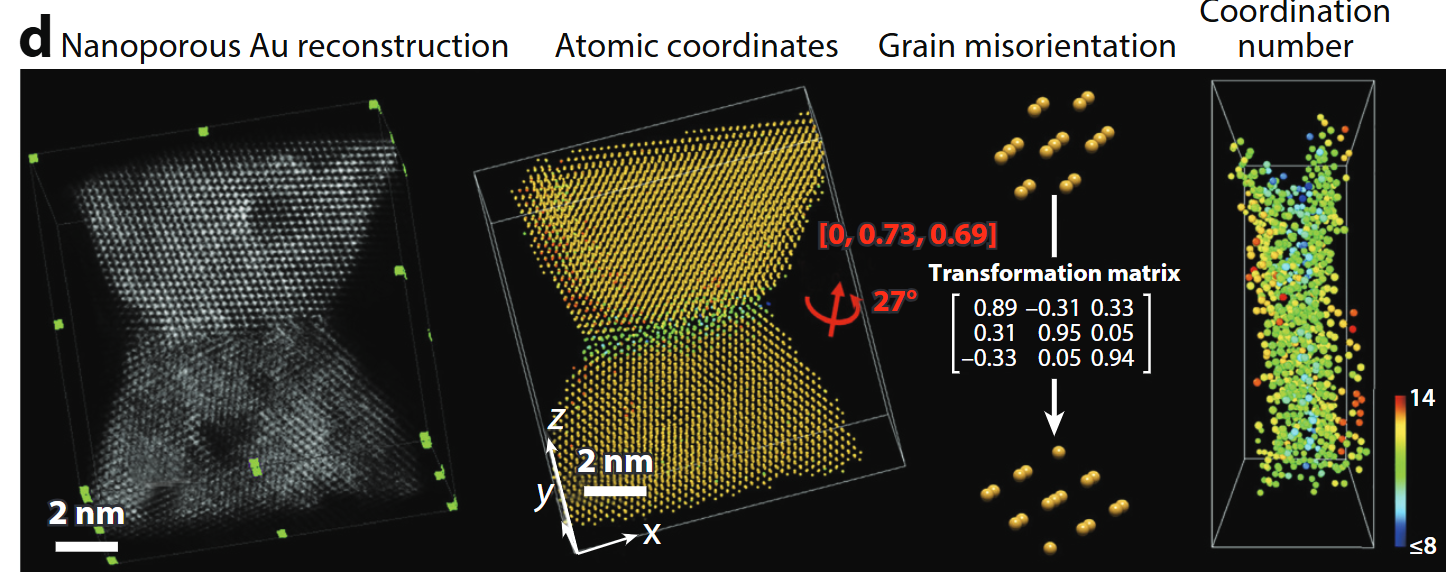
- Tilt-series HAADF/ptychography + iterative reconstruction → 3-D coordinates of every atom in ≤20 nm objects .
- Enables full strain tensors, defect cores, compositional ordering.
Simulation accelerators – PRISM
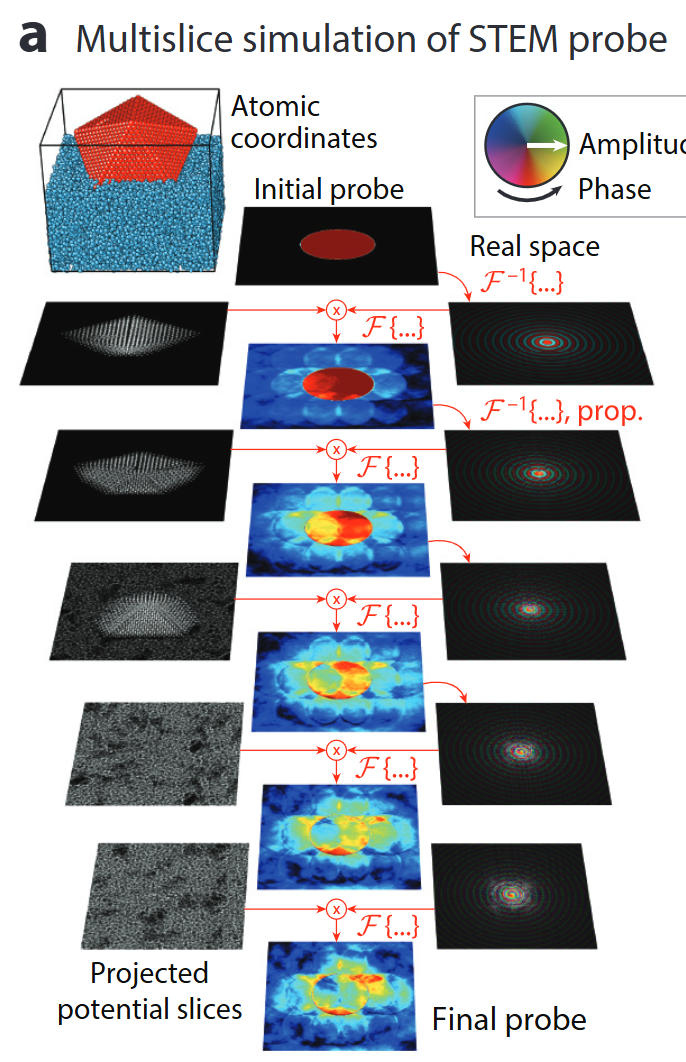
- Quantitative STEM hinges on ab-initio accurate multislice simulations.
- PRISM re-uses plane-wave slices → orders-of-magnitude faster with <1 % error .
- Powers real-time experiment steering & big-data 4D-STEM analysis.
The data deluge: detector rates over time
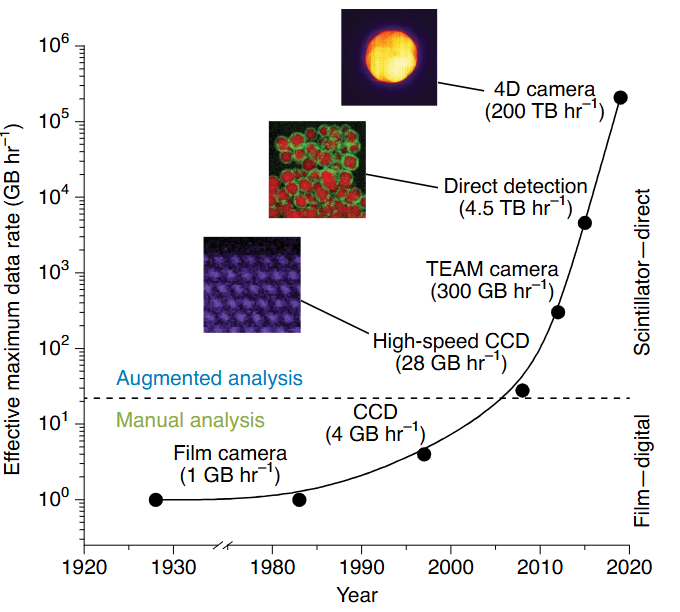
- Film era (1990s): ≈ 1 GB h⁻¹
- CCD/CMOS (2000s–2010s): 1–10 GB h⁻¹
- Direct-electron detectors (today): up to 200 TB h⁻¹
- That is a 10⁸× increase in two decades.
- No human can inspect petabyte-scale datasets by eye.
From data to insight: the three-layer framework
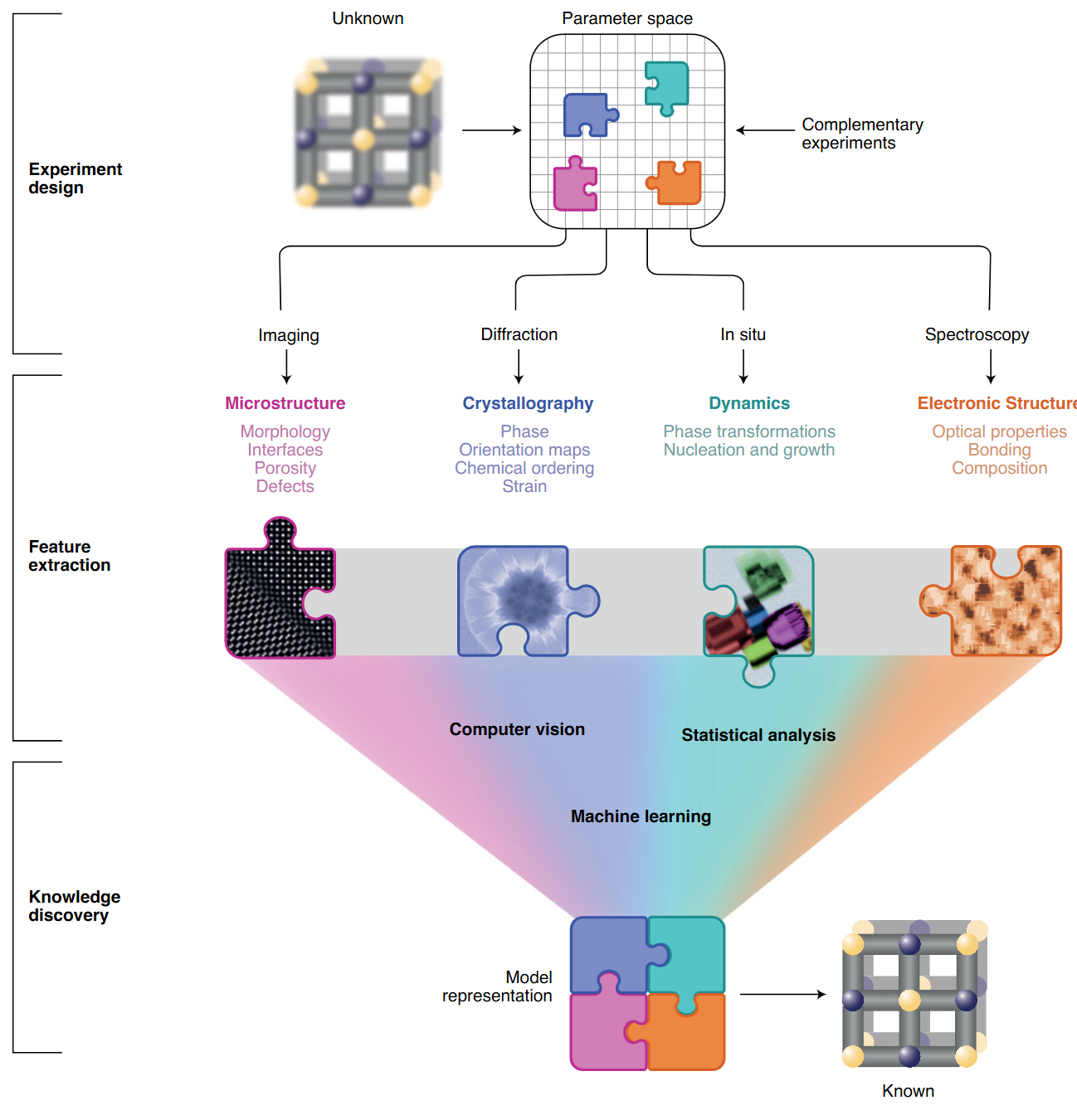
- Layer 1 — Experiment design: What to measure, at what dose, in what sequence.
- Layer 2 — Feature extraction: Turn raw pixel/spectrum data into structured descriptors.
- Layer 3 — Knowledge discovery: ML + simulation → structure, chemistry, dynamics.
- The layers form a feedback loop: discoveries suggest new experiments.
Manual vs. augmented EM workflow
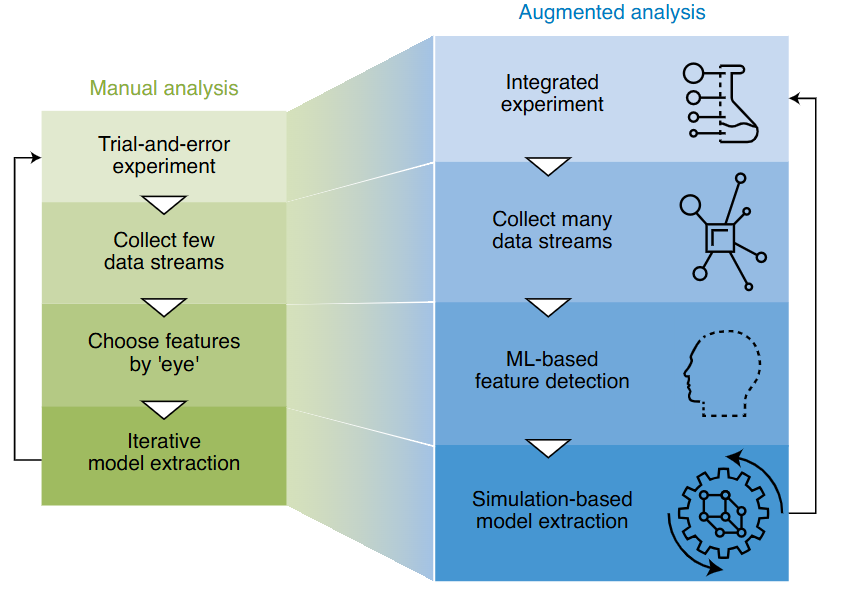
- Manual: Choose features by eye, collect one modality, iterate slowly.
- Augmented: Collect complete data streams, ML finds features automatically, simulation validates.
- Goal: Closed-loop, autonomous experiment steering.
The CRISP-DM workflow — one EM example
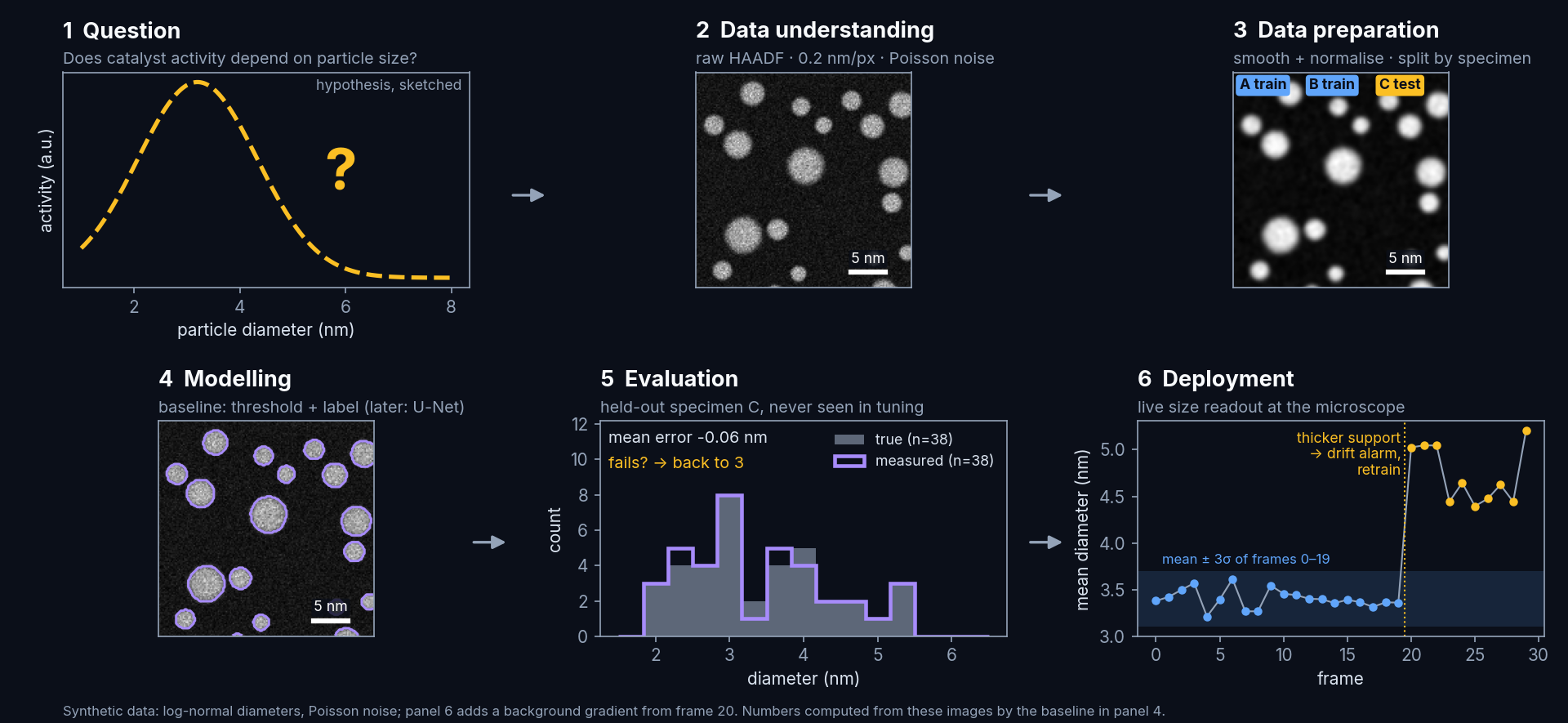
The steps loop back: a failed evaluation sends you back to data preparation, not to a bigger model.
Hands-on in molab: PyTorch tensors & automatic differentiation
- Open in molab:
![Open in molab]()
- To edit: sign in to molab (free, Google or e-mail) → click Fork → your own copy, saved in your workspace. Run it now runs it without saving.
- Notebook file:
notebooks/unit01_tensors_autograd.py(marimo, also on GitHub). - Part 1, data manipulation Zhang, Aston et al., (2023): create, reshape, index, compute, broadcast, save memory, convert to NumPy.
- Part 2, automatic differentiation Zhang, Aston et al., (2023):
backward(), gradient accumulation, non-scalar outputs,detach(), control flow. - Exercises with automatic checks: ROI crop, 3-D broadcasting, \(\frac{d}{dx}\sin x\) by autograd, the chain rule for \(f(x) = (\log x^2)\sin x + x^{-1}\).

- marimo is reactive: change a cell or a slider and every dependent cell runs again.
- Every section has an EM example: Poisson images, the log scale for diffraction, frame averaging, threshold masks, scan-stripe removal.
Self-study this week
- Notebook:
notebooks/week01_python_numpy.ipynb— “Python & NumPy in 90 minutes.”- Variables, lists, functions, NumPy arrays, broadcasting, matplotlib.
- Final “your turn” exercise: crop and min-max-normalise a synthetic STEM-like image.
- Open in Colab:
![Open In Colab]() — no local installation needed.
— no local installation needed. - molab notebook:
![Open in molab]() — sign in and click Fork to get your own editable copy, then finish the exercises that you did not complete in class.
— sign in and click Fork to get your own editable copy, then finish the exercises that you did not complete in class. - Goal: understand everything in both notebooks before Week 2.
- If you are stuck: the StudOn forum, or office hours (times announced on the website).