Machine Learning in Materials Processing & Characterization
Unit 5: Convolutional Neural Networks for Microstructure Analysis



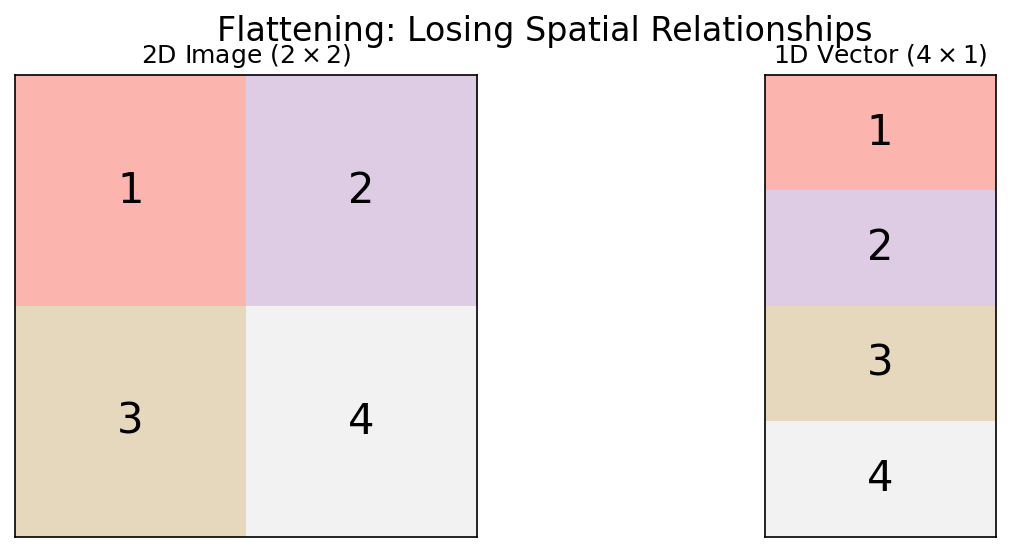
06. Loss of Spatial Structure
- MLPs flatten images into 1D vectors: pixel (0,0), pixel (0,1), …
- Result: Neighboring pixels (same grain) are treated identically to distant pixels (different phases)
- The spatial correlation — the key physical information — is destroyed
11. Visualizing the Sliding Window
- Input: \(5 \times 5\) image
- Kernel: \(3 \times 3\)
- Output: \(3 \times 3\) feature map (without padding)
- Each output pixel “sees” a \(3 \times 3\) local neighborhood
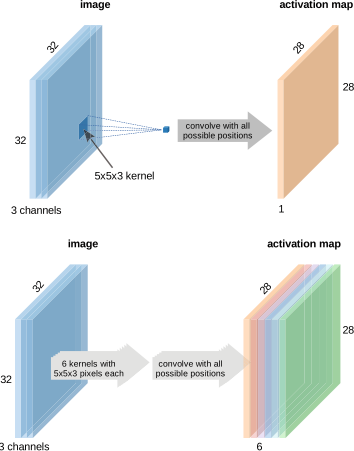
18. Multi-Channel Convolution
- Real images have depth (channels):
- Grayscale: 1 channel
- RGB: 3 channels
- Hyperspectral: 100+ channels
- Feature maps from previous layer: \(C\) channels
A kernel on multi-channel input has shape \(C \times k \times k\). It sums across all channels.
27. The Hierarchy of Features
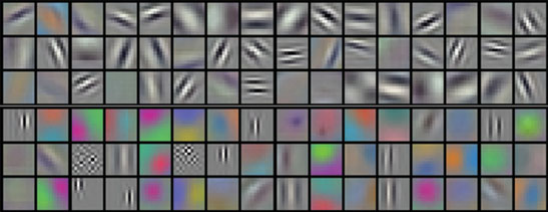
- Layer 1: Simple edges, dots, intensity gradients
- Layer 2: Textures, corners, simple shapes (grain boundary segments)
- Layer 3: Complex morphologies (dendrites, twins, precipitate clusters)
- Final layers: Global material state or classification
32. Max Pooling
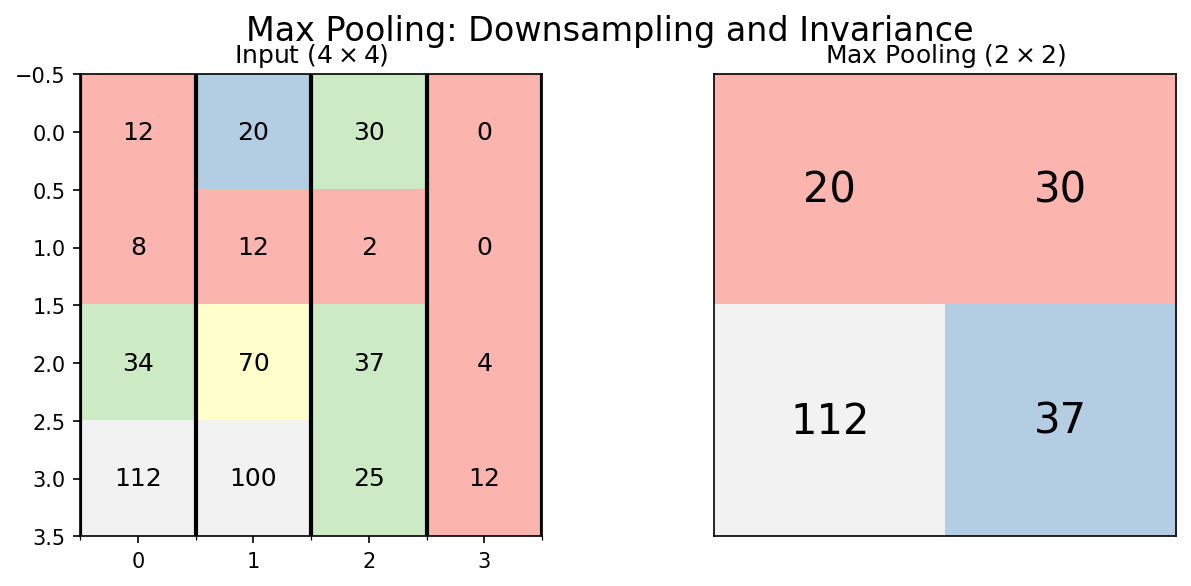
- Take the maximum value in each window (typically \(2 \times 2\))
- Preserves the strongest signal in each region
- Spatial size: halved in each dimension
\[\text{MaxPool}(x)_{m,n} = \max_{i,j \in \text{window}} x_{m+i, n+j}\]
36. Hierarchical Features: From Edges to Phases
Early layers (Block 1-2):
- Edges, intensity gradients
- Grain boundary segments
- Local texture patterns
Deep layers (Block 3-4):
- Grain shapes, phase morphologies
- Precipitate distributions
- Global arrangement patterns
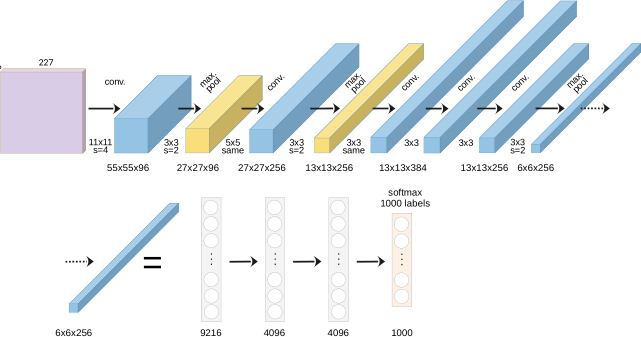
39. LeNet-5 (1995): The Ancestor
- Yann LeCun: Handwritten digit recognition (postal codes)
- Architecture: 2 conv layers → 2 pooling → 3 FC layers
- Only ~60K parameters — tiny by modern standards
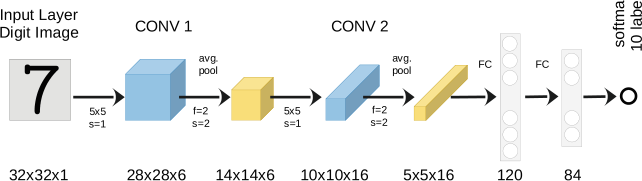
Legacy: Proved that learned features outperform hand-crafted features for vision tasks.
40. AlexNet (2012): The Deep Learning Revolution
- Won ImageNet competition by a massive margin (15.3% vs. 26.2% error)
- Key innovations:
- ReLU activation (fast training, no vanishing gradients)
- Dropout regularization (prevents overfitting)
- GPU training (made deep networks practical)
- 60 million parameters, 8 layers
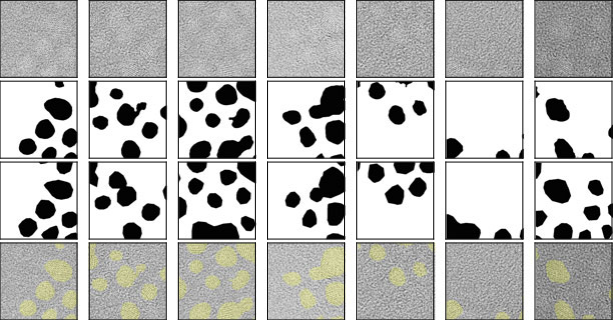
45. Case Study: Phase Segmentation in TEM
- Task: Segment crystalline Au nanoparticles from amorphous background
- Method: U-Net trained on labeled TEM frames
- Challenge: Limited labeled data, noisy images, beam damage
46. Case Study: Synthetic Training Data
- Problem: No labeled SEM grain microstructures available
- Solution: Generate synthetic grain structures using Voronoi tessellations
- Parameters: number of seeds, regularity, boundary thickness
- Result: Perfect labels for free — no expert annotation needed!
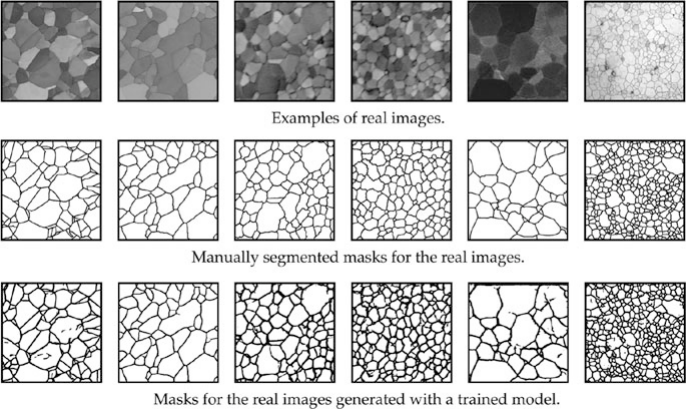
47. Case Study: Synthetic-to-Real Transfer
- Train only on Voronoi synthetic data
- Test on real polycrystalline SEM images
- Result: Nearly perfect grain boundary segmentation!
The synthetic data captured the topological truth of grain networks — the CNN learned grain boundary detection without ever seeing a real micrograph.
48. Case Study: Property Prediction from Microstructure
- Task: Classify Ising model microstructures by simulation temperature
- Input: 2D spin configurations (binary images)
- Method: CNN classifier trained on labeled configurations
- Result: CNN learns to detect the phase transition temperature from microstructure alone