Machine Learning in Materials Processing & Characterization
Unit 6: Data Scarcity & Transfer Learning


Prof. Dr. Philipp Pelz

FAU Erlangen-Nürnberg

FAU Logo IMN Logo CENEM Logo ERC Logo Eclipse Logo

01. The Materials Data Bottleneck

  • Expensive data: 1 micrograph ≈ hours of prep + days of labeling
  • Big models vs. small data: A model with \(10^7\) parameters will memorize 100 samples
  • Goal: Build deep models that generalize even when data is scarce

02. Learning Outcomes

By the end of this unit, you can:

  1. Explain why materials data is scarce and how this leads to overfitting
  2. Design physically valid augmentation pipelines
  3. Distinguish feature extraction from fine-tuning in transfer learning
  4. Apply gradual unfreezing and differential learning rates
  5. Evaluate synthetic-to-real transfer approaches
  6. Build a complete small-data training workflow

Part 1: The Small Data Challenge

Slides 03–08

03. The “Big Data” Myth in Materials Science

  • Materials labs generate TBs of raw data (e.g., 4D-STEM datasets)
  • But labeled data is extremely sparse
  • In computer vision (ImageNet): labels are cheap (crowdsourcing)
  • In materials science: labels require PhD-level experts and hours of annotation

04. Why Is Materials Data Scarce?

  1. High acquisition cost: Synchrotron beamtime, specialized TEMs
  2. Limited facility access: Only a few instruments in the world for some techniques
  3. Expert annotation time: Segmenting 100 grains in an SEM takes hours
  4. Reproducibility barriers: Different instruments produce different images

05. The Labeled Data Gap

Domain Typical Dataset Size Labels
ImageNet 14,000,000 images Crowdsourced
Medical Imaging 10,000–100,000 Expert radiologists
Materials Science 50–500 images PhD microscopists

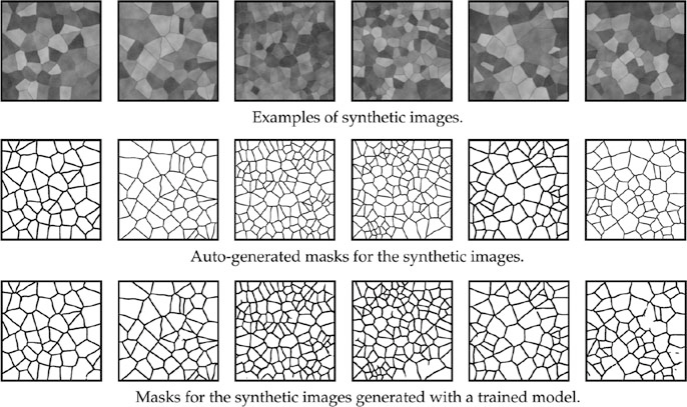
Standard deep learning (ResNet-50: 25M parameters) is designed for 1M+ images.

If we train from scratch on 100 images → guaranteed overfitting.

06. Overfitting on Small Data

  • Model “memorizes” specific noise and artifacts of those 100 images
  • Fails catastrophically on a new dataset from a different microscope
  • Classic symptoms:
    • Training accuracy: 99%
    • Test accuracy: 55% (barely better than random)

07. The “Small Data” Survival Kit

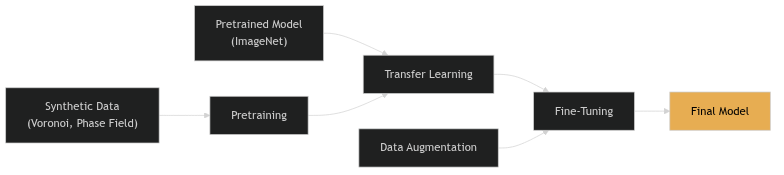
Three strategies to overcome data scarcity:

  1. Data Augmentation: Multiply data by applying valid transformations
  2. Transfer Learning: Reuse knowledge from large-dataset models
  3. Synthetic Training: Generate labeled data for free using simulations
graph LR
    PT["Pretrained Model<br>(ImageNet)"] --> TL["Transfer Learning"]
    SD["Synthetic Data<br>(Voronoi, Phase Field)"] --> Pre["Pretraining"]
    Pre --> TL
    TL --> FT["Fine-Tuning"]
    Aug["Data Augmentation"] --> FT
    FT --> M["Final Model"]
    style M fill:#e7ad52,color:#000

08. Part 1 Recap

  1. Materials science has a labeled data bottleneck (50-500 images typical)
  2. Standard deep learning overfits massively on small datasets
  3. Three complementary strategies: Augmentation, Transfer, Synthetic
  4. These strategies are not alternatives — use them all together

Part 2: Data Augmentation

Slides 09–20

09. Concept: Artificially Expanding the Dataset

  • “Reusing existing images by applying transformations”
  • A form of oversampling — the same physical content, different pixel arrangements
  • Forces the network to focus on structure, not specific pixel patterns

10. Geometric Transformations

  • Flips: Horizontal, vertical
  • Rotations: 90°, 180°, 270° (or arbitrary angles)
  • Scaling/Cropping: Zoom in/out, random crops
  • Elastic deformation: Simulating sample warping or drift

Each transformation multiplies your effective dataset size. Flips alone give 4× more data.

11. Invariance via Augmentation

  • By rotating images, we force the network to be rotation-invariant
  • Crucial for microstructures where “up” and “down” are arbitrary
  • The augmentation encodes physical knowledge into the training process

Note

Augmentation is a way to tell the network: “This transformation doesn’t change the physics.”

12. When Augmentation Is “Illegal”

Physical reality check: Transformations must not violate materials physics!

  • Don’t rotate if there’s a physical gradient (e.g., surface hardening layer, directional solidification)
  • Don’t flip vertically if gravity matters (e.g., sedimentation structures)
  • Don’t warp if topology is critical (e.g., grain boundary network connectivity)

Think before you augment: “Would this transformation produce a physically plausible image?”

13. Intensity Transformations

  • Brightness jittering: ±10-20% intensity variation
  • Contrast adjustment: Simulating different detector settings
  • Gamma correction: Non-linear intensity mapping

Purpose: Make the model robust to different imaging conditions. A model trained at one brightness level should work at another.

14. Adding “Physical” Noise

Gaussian noise: Electronic/thermal noise

  • Simulates detector readout noise
  • Makes model robust to noisy images

Poisson/Shot noise: Counting statistics

  • Simulates low-dose conditions
  • Important for electron microscopy

Blur: Gaussian or motion blur

  • Simulates defocus or sample drift
  • Forces model to rely on structure, not sharpness

15. Advanced Augmentations

  • CutOut / Random Erasing: Mask random regions with zeros
    • Handles occlusions and artifacts (contamination spots)
  • Mixup: Linear combination of two images and their labels
    • \(x' = \lambda x_1 + (1-\lambda) x_2\), \(y' = \lambda y_1 + (1-\lambda) y_2\)
    • Regularizes the model, smooths decision boundaries

16. Implementation: Torchvision & Albumentations

import albumentations as A

transform = A.Compose([
    A.HorizontalFlip(p=0.5),
    A.RandomRotate90(p=0.5),
    A.GaussNoise(var_limit=(10, 50), p=0.3),
    A.RandomBrightnessContrast(p=0.3),
    A.ElasticTransform(alpha=120, sigma=6, p=0.2),
])

# Apply to image AND mask simultaneously
augmented = transform(image=image, mask=mask)

17. On-the-fly vs. Offline Augmentation

Offline:

  • Generate augmented images on disk before training
  • Pro: Faster training
  • Con: Fixed set of augmentations

On-the-fly (preferred):

  • Transform images in RAM during each batch
  • Pro: Infinite diversity — each epoch sees different augmentations
  • Con: Slightly slower per batch

18. The Label Consistency Rule

If you transform the image, you must transform the labels identically!

  • Rotate image → rotate mask
  • Flip image → flip mask
  • Crop image → crop mask at the same location
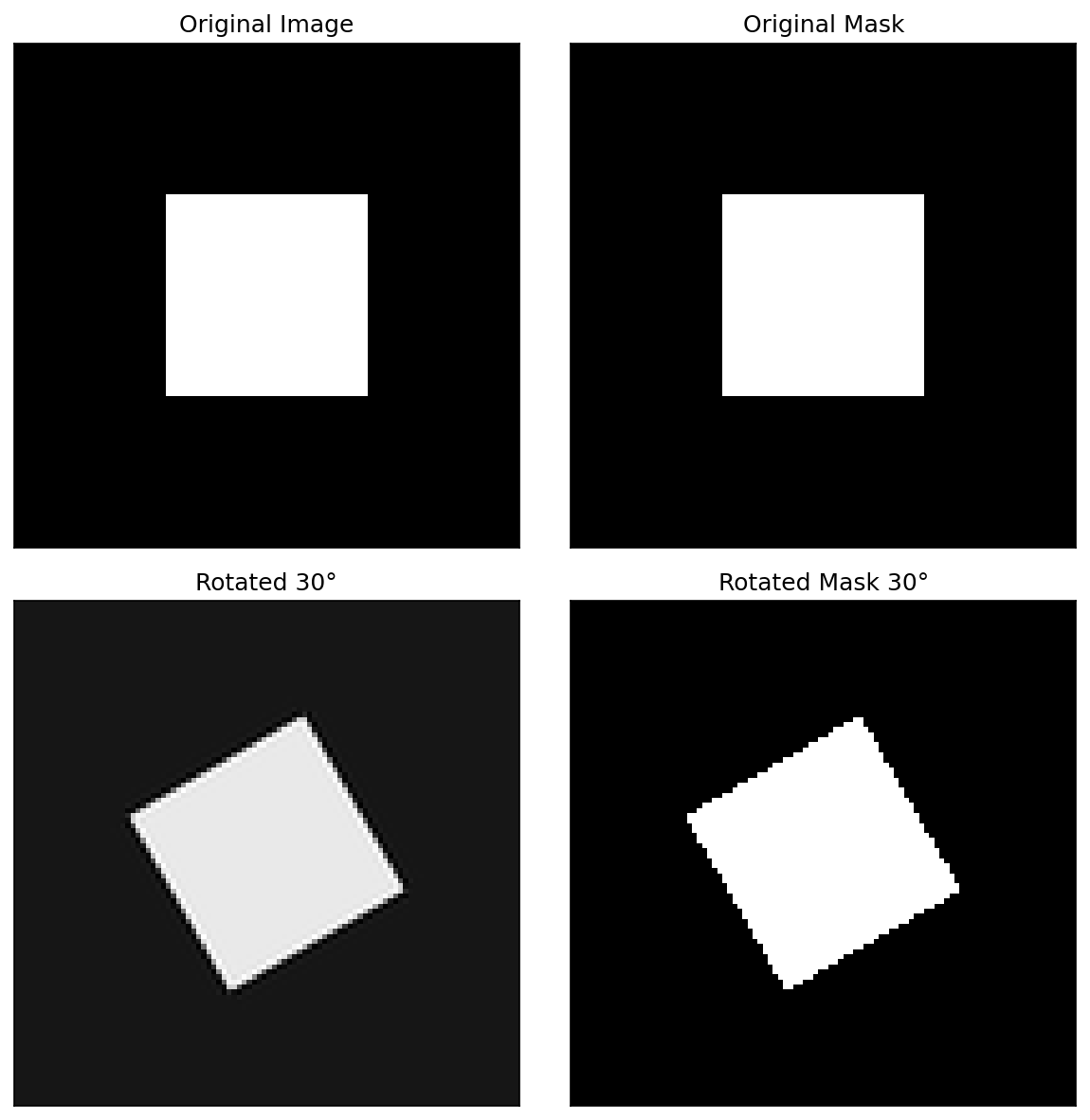
Intensity augmentations (brightness, noise) don’t affect labels — only geometric ones do.

19. Think About This: Augmentation Design

Scenario: You have 50 SEM images of a laser-welded joint. The weld bead runs left-to-right. You want to classify weld quality (good/defective).

Which augmentations are valid?

  • Horizontal flip: Valid (symmetric about weld center)
  • Vertical flip: Invalid (top surface ≠ bottom)
  • 90° rotation: Invalid (weld direction matters)
  • Brightness jitter: Valid
  • Gaussian noise: Valid

20. Part 2 Recap

  1. Augmentation multiplies your effective dataset size
  2. Geometric transforms encode physical symmetries
  3. Only apply transformations that produce physically plausible images
  4. Noise augmentation prepares models for real experimental conditions
  5. Always transform images and labels together

Part 3: Transfer Learning

Slides 21–32

21. Concept: Knowledge Reuse

“Learning on Peas to count Lentils.” — Sandfeld (2024)

  • Take a model trained on Task A (e.g., classifying dogs vs. cats)
  • Adapt it for Task B (e.g., classifying phases in micrographs)
  • Why does this work? Because early visual features are universal

22. Why ImageNet Features Transfer

ImageNet: 14 million images, 1000 classes (dogs, cats, cars, buildings…)

The hierarchical features learned on ImageNet:

  • Layer 1: Edges, gradients → universal
  • Layer 2: Textures, corners → mostly universal
  • Layer 3: Object parts → domain-specific
  • Layer 4+: Full objects → very domain-specific

Early layers transfer well. Late layers need adaptation.

23. The Backbone and the Head

graph LR
    I["Input<br>Image"] --> BB["Backbone<br>(ResNet, VGG)<br>Pretrained"]
    BB --> H["Head<br>(FC layers)<br>New"]
    H --> O["Output<br>(your classes)"]
    style BB fill:#4a9eff,color:#fff
    style H fill:#e7ad52,color:#000

  • Backbone: The feature extractor — pretrained on ImageNet
  • Head: The classifier/regressor — newly initialized for your task
  • Replace the head to match your number of classes

24. Strategy 1: Feature Extraction

  • Freeze the entire backbone (no weight updates)
  • Train only the new head on your materials dataset
  • The backbone becomes a fixed feature extractor

When to use: Very small dataset (<100 images), risk of overfitting is high.

Advantage: Fast training, minimal risk of destroying pretrained features.

Disadvantage: Cannot adapt backbone to domain-specific textures.

25. Strategy 2: Fine-Tuning

  • Initialize with pretrained weights
  • Train the entire network (or the last few layers)
  • Use a very low learning rate for the backbone

When to use: Moderate dataset (100-1000 images), enough to adapt the backbone.

Advantage: Backbone adapts to “micrograph-specific” textures.

Risk: Catastrophic forgetting — destroying useful pretrained features with aggressive updates.

26. Differential Learning Rates

  • High LR for the head (\(10^{-3}\)): Learning new classes from scratch
  • Low LR for the backbone (\(10^{-5}\)): Gently adapting existing features
  • Ratio: Typically 100× between head and backbone
optimizer = torch.optim.Adam([
    {'params': model.backbone.parameters(), 'lr': 1e-5},
    {'params': model.head.parameters(), 'lr': 1e-3},
])

27. Gradual Unfreezing

A safer fine-tuning protocol:

  1. Freeze all backbone layers. Train head until convergence.
  2. Unfreeze the last backbone block. Train with low LR.
  3. Unfreeze the next block. Train further.
  4. Repeat until the entire network is fine-tuned.

This prevents catastrophic forgetting of low-level features while allowing high-level adaptation.

28. The Domain Gap: Natural vs. Scientific

Natural images and micrographs differ in:

  • Color: RGB vs. grayscale / 16-bit
  • Perspective: 3D with vanishing points vs. orthographic top-down
  • Textures: Organic, varied vs. crystallographic, periodic
  • Noise: Compression artifacts vs. shot noise

If the domain gap is large, more fine-tuning is needed. Feature extraction alone may not suffice.

29. Cross-Material Transfer

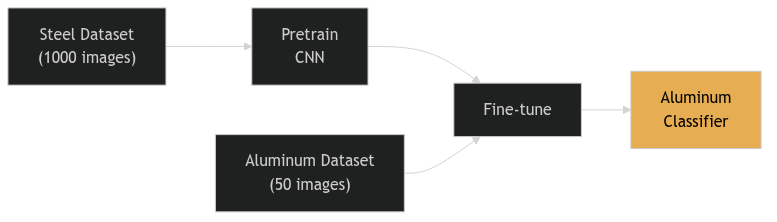
  • Train on a large database of steel micrographs
  • Fine-tune on a small set of aluminum samples
  • Physics intuition: Grain boundary topology is similar across alloy systems
graph LR
    S["Steel Dataset<br>(1000 images)"] --> PT["Pretrain<br>CNN"]
    PT --> FT["Fine-tune"]
    A["Aluminum Dataset<br>(50 images)"] --> FT
    FT --> M["Aluminum<br>Classifier"]
    style M fill:#e7ad52,color:#000

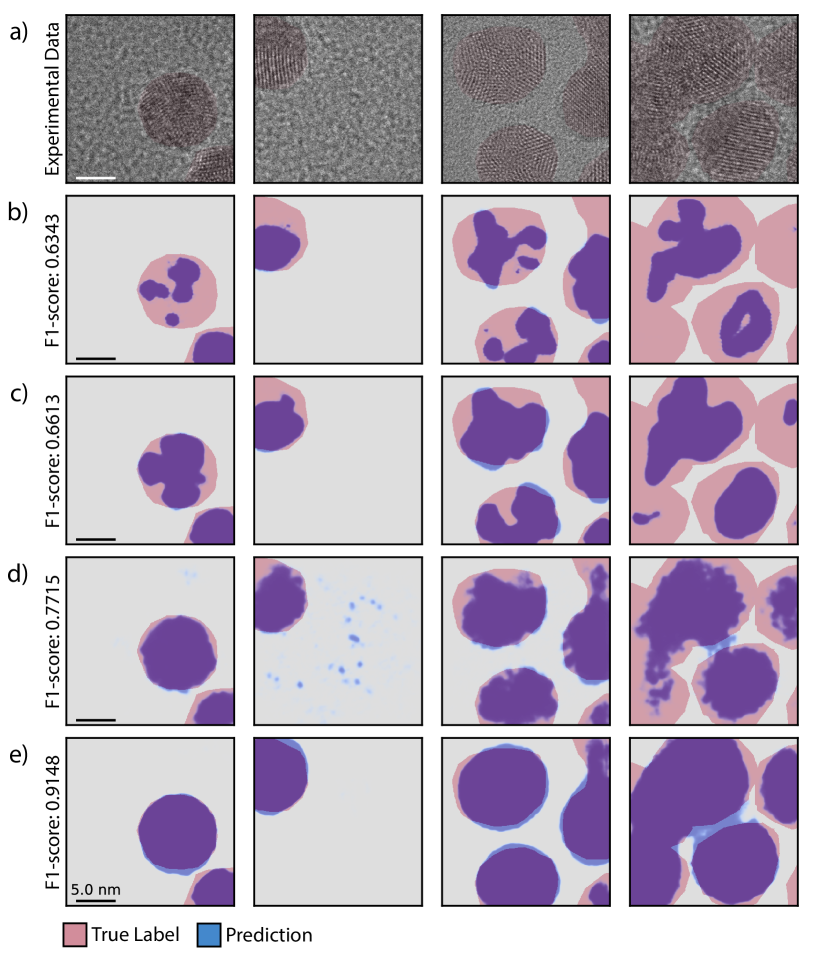
30. Success Story: Au Nanoparticle Segmentation

  • Task: Segment crystalline Au nanoparticles from amorphous TEM background
  • Method: U-Net initialized with ImageNet weights
  • Result: High accuracy despite limited labeled TEM frames
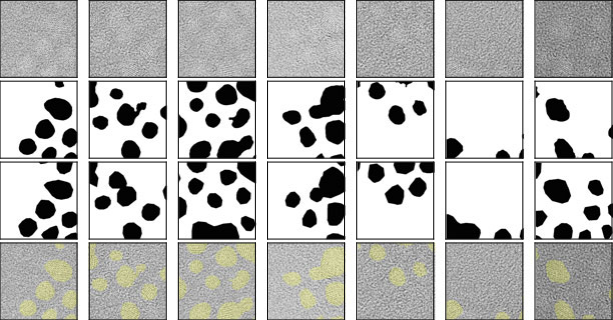
ImageNet pretraining helped even though ImageNet contains no TEM images — the low-level features transferred.

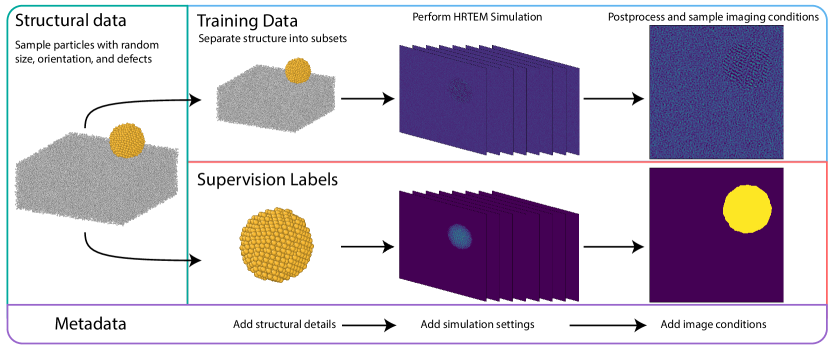
31. Transfer from Simulations

  • Pretrain on simulated data (DFT, molecular dynamics, phase field)
  • Fine-tune on real experiments
  • Advantage: Simulations provide unlimited labeled data at zero annotation cost

The next frontier: physics-simulation-based pretraining for materials ML.

32. Part 3 Recap

  1. Don’t train from scratch — always start with a pretrained backbone
  2. Feature extraction: Freeze backbone, train head only (safest)
  3. Fine-tuning: Adapt backbone with low LR (more powerful)
  4. Gradual unfreezing prevents catastrophic forgetting
  5. Differential learning rates: 100× between head and backbone
  6. Transfer works across domains (natural → scientific) and materials (steel → aluminum)

Part 4: Learning from Synthetic Data

Slides 33–42

33. The “Infinite Data” Dream

  • If we can simulate the microstructure, we can generate unlimited labeled data
  • Perfect masks for free: No expert annotation needed
  • Controllable: We choose the parameters (grain size, phase fraction, noise level)

Note

Synthetic data flips the labeling bottleneck: instead of labeling real images, we generate images from known structures.

34. Generating Grain Microstructures

Voronoi Tessellations:

  • Distribute random seed points in 2D
  • Assign each pixel to its nearest seed → grain regions
  • Parameters: number of seeds (grain count), regularity, boundary thickness
35. From Geometry to Realistic Image

A raw Voronoi diagram doesn’t look like an SEM image. We need to add:

  1. Grain contrast: Random intensity per grain
  2. Boundary appearance: Thickened, possibly bright or dark boundaries
  3. Texture: Per-grain crystallographic texture
  4. Noise: Gaussian + Poisson to simulate detector noise
  5. Blur: Slight defocus

36. The Sim-to-Real Gap

  • Synthetic data is often “too clean” or “too regular”
  • Real microstructures have:
    • Non-uniform lighting
    • Sample preparation artifacts (scratches, contamination)
    • Complex grain morphologies that Voronoi can’t capture

CNNs might learn synthetic-only features and fail on real SEMs.

37. Domain Adaptation: Closing the Gap

Making synthetic images look more like real ones:

  • Style transfer: Apply the “style” of real SEMs to synthetic geometry
  • GANs (Generative Adversarial Networks): Train a generator to produce realistic textures
  • Noise modeling: Use measured noise characteristics from real instruments

38. Case Study: SEM Grain Segmentation

  • Model trained only on Voronoi synthetic data
  • Tested on real polycrystalline SEM images
  • Result: Nearly perfect grain boundary segmentation!
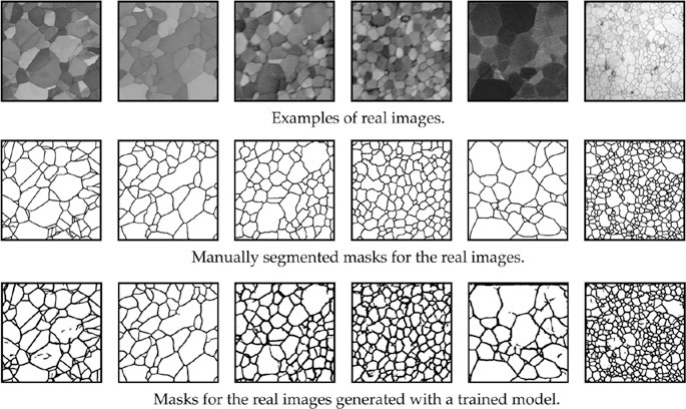
The synthetic data captured the topological truth of grain networks — boundaries, junctions, and connectivity patterns.

39. Adaptive Data Generation

  1. Train on 1000 synthetic images
  2. Test on real images → find the hardest cases (worst predictions)
  3. Analyze what makes them hard (unusual grain shapes? specific textures?)
  4. Generate targeted synthetic data mimicking those hard cases
  5. Retrain and iterate

This is a form of active learning for synthetic data generation.

40. Procedural Generation for Spectra

Synthetic data works for more than images:

  • XRD patterns: Simulate peaks with varying noise, background, and peak overlap
  • EELS spectra: Simulate edges with realistic energy loss and plural scattering
  • EDS maps: Simulate elemental distributions with counting noise

The same principle: if you can simulate it, you can label it for free.

41. Think About This: When Synthetic Data Fails

Scenario: You generate synthetic EBSD maps using a grain growth simulation. Your CNN achieves 95% accuracy on synthetic test data but only 60% on real EBSD maps.

What went wrong?

Possible causes:

  1. Sim-to-real gap: Simulated grain shapes too regular
  2. Missing artifacts: Real EBSD has indexing errors, no-solution pixels
  3. Missing physics: Simulation doesn’t capture twinning or deformation textures
  4. Overfitting to synthetic style: Model learned simulation artifacts

42. Part 4 Recap

  1. Synthetic data provides unlimited labeled data at zero annotation cost
  2. Voronoi tessellations are a simple but effective grain generator
  3. Realism pipeline (contrast, texture, noise, blur) bridges the sim-to-real gap
  4. Domain adaptation (style transfer, GANs) for difficult domain gaps
  5. Adaptive generation focuses on the hardest cases

Part 5: Practical Workflow & Best Practices

Slides 43–50

43. The Complete Fine-Tuning Recipe

  1. Select a pretrained architecture (e.g., ResNet-50, EfficientNet)
  2. Replace the final layer for your number of classes/targets
  3. Freeze all backbone layers
  4. Train the head with standard LR (\(10^{-3}\)), augmented data
  5. Unfreeze gradually, train with low LR (\(10^{-5}\))
  6. Early stopping based on validation loss

Note

This recipe works for 90% of materials classification and segmentation tasks.

44. Validation in the Small Data Regime

  • K-Fold CV is mandatory (Unit 3 review)
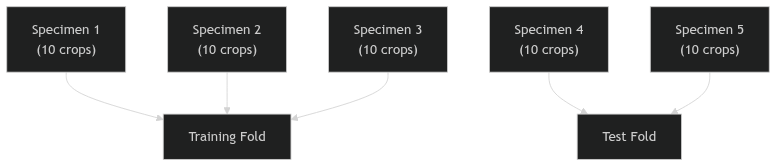
  • Be extremely wary of augmentation leakage: don’t have an image and its rotation in both train and test!
  • Always split by specimen, not by individual crop
from sklearn.model_selection import GroupKFold
gkf = GroupKFold(n_splits=5)
for train_idx, test_idx in gkf.split(X, y, groups=specimen_ids):
    # Each fold: all crops from one specimen in same fold
    ...

45. Group-Based Splitting Revisited

graph TD
    S1["Specimen 1<br>(10 crops)"] --> Train["Training Fold"]
    S2["Specimen 2<br>(10 crops)"] --> Train
    S3["Specimen 3<br>(10 crops)"] --> Train
    S4["Specimen 4<br>(10 crops)"] --> Test["Test Fold"]
    S5["Specimen 5<br>(10 crops)"] --> Test

  • If you have 5 specimens with 10 crops each = 50 images
  • Split by specimen: 3 train, 2 test (not 40 random/10 random!)
  • Then augment the 30 training images to 300+

46. Early Stopping

  • Monitor validation loss during training
  • Stop when validation loss starts increasing (even if training loss is still decreasing)
  • Small datasets are prone to sudden overfitting late in training
early_stopping = EarlyStopping(
    monitor='val_loss',
    patience=10,      # Wait 10 epochs before stopping
    restore_best_weights=True
)

47. Active Learning: Maximizing Expert Time

  • Instead of labeling all images equally, let the model guide annotation
  • Uncertainty-based: Label images where the model is most uncertain
  • Diversity-based: Label images that are most different from already-labeled data

Maximizes the value of every expert hour — 50 strategically chosen labels can beat 500 random ones.

48. The “Gold Standard” Test Set

  • Even with TL/augmentation/synthetic data, you need a small, high-quality benchmark test set
  • Hand-labeled by multiple experts
  • From a different instrument or session than training data
  • This is the absolute benchmark — never touched during training

Your model is only as credible as your test set is rigorous.

49. Summary: The Complete Small-Data Strategy

  1. Augment your data to enforce physical invariances
  2. Transfer knowledge from ImageNet or domain-specific pretrained models
  3. Synthetic data provides infinite labels if generated carefully
  4. Validate rigorously: grouped K-fold, early stopping, gold standard test set
  5. Combine all three strategies for maximum effectiveness

50. Unit 6 Summary & Next Steps

Key Takeaways:

  1. Materials science is the land of small data — act accordingly
  2. Augmentation is free — use it always, but respect the physics
  3. Transfer learning is the single most impactful technique
  4. Synthetic data can replace expensive annotation
  5. Validation must be even more rigorous when data is scarce

Reading:

Next Week: Unit 7 — Learning from Processing Data: Time Series & Sequence Models

References

McClarren, Ryan G. 2021. Machine Learning for Engineers: Using Data to Solve Problems for Physical Systems. Springer.
Neuer, Michael et al. 2024. Machine Learning for Engineers: Introduction to Physics-Informed, Explainable Learning Methods for AI in Engineering Applications. Springer Nature.
Sandfeld, Stefan et al. 2024. Materials Data Science. Springer.